
SpeakerPro
SpeakerPro is an AI-driven Text-To-Speech Synthesizer module delivering high quality audio with natural-sounding voices. Its main purpose is to engineer speech samples from short phrases.
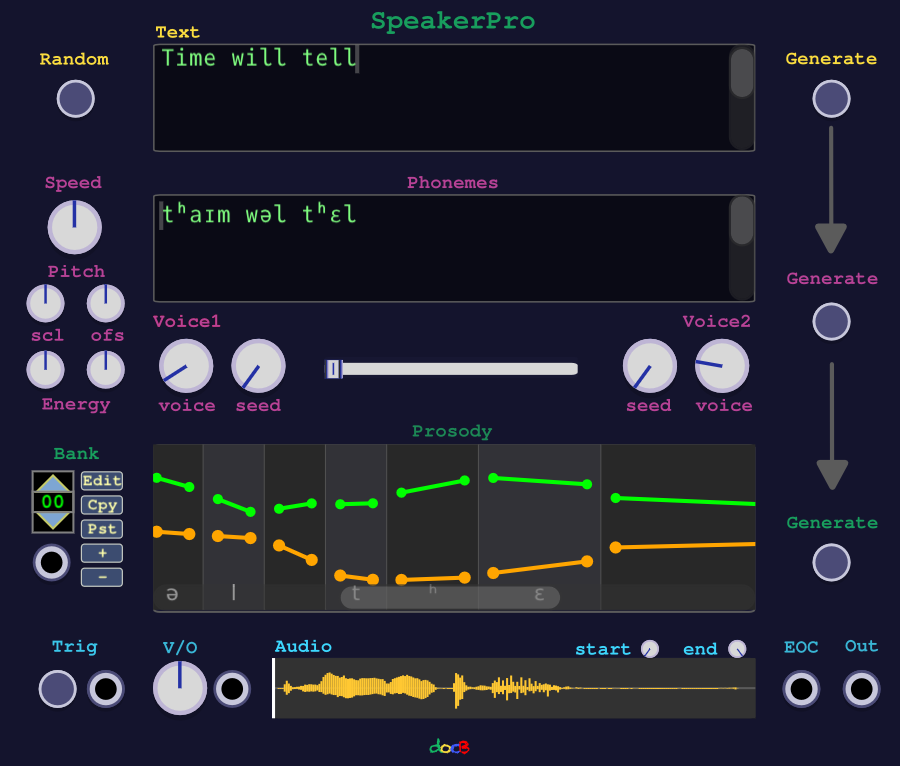
Quick Start
SpeakerPro is available in the VCV Rack Library. After installing the when starting the first time the module will download ai models, which may take a while.
When the module is up and running:
- Connect the audio out to a mixer or audio module
- Click on random button left of the text field
- an english proverb appears
- Click on Generate on the right side of the text field
- Click on Trig button on the bottom left and hear the spoken text
- Select another voice 1 and click Generate again
Overview
The Module has a pipeline with four sections: Text, Phonemes, Prosody, Audio
Text

The top Text section provides a text editor where the text which should be spoken can be entered. For testing there is a random button inserting an english proverb. By clicking on Generate the whole pipeline will be processed:
- Text is converted to phonemes
- Phonemes are encoded and prosody (pitch,energy,durations) is generated using a voice style
- Prosody and encoded Phonemes are synthesized or decoded to audio visible in the audio section.
For handling different languages see section "Language Support"
Phonemes
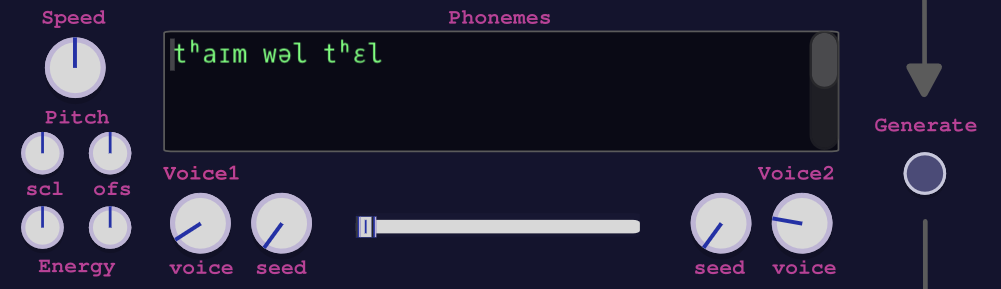
The Phonemes section provides a special Phoneme editor where either previously generated or new Phonemes can be edited. (see also section Phoneme Editor) Note: The phonemes are always overwritten when generating new ones from text above. So after changing Phonemes the Generate button on the right side of the Phoneme Window has to be used.
At this stage voices styles can be selected. There are 54 voice styles currently available:
- 🇺🇸 American English: 11F 9M, prefix a
- 🇬🇧 British English: 4F 4M, prefix b
- 🇯🇵 Japanese: 4F 1M, prefix j
- 🇨🇳 Mandarin Chinese: 4F 4M, prefix z
- 🇪🇸 Spanish: 1F 2M, prefix e
- 🇫🇷 French: 1F, prefix f
- 🇮🇳 Hindi: 2F 2M, prefix h
- 🇮🇹 Italian: 1F 1M, prefix i
- 🇧🇷 Brazilian Portuguese: 1F 2M, prefix p
For accent free results the language (see prefix) of the text should match the voice style. There can be two voice styles be selected and mixed. When selecting voice style 'random' a random mix of the predefined voice styles is generated.
The phonemes are converted into prosody, which includes pitch, energy, and duration information that gives the audio a natural-sounding quality. The result can be influenced by using the following parameters (knobs):
- The speed parameter is used to scale the durations of the phonemes, allowing for faster or slower speech output.
- The pitch scl parameter scales the generated pitch curve. A value of zero produces a flat pitch curve, while a value > 1 increases the pitch differences.
- The pitch ofs parameter shifts the generated pitch curve up or down.
- Likewise, the energy scl and ofs parameters scale and offset the generated energy curve.
After changing/correcting/editing the phonemes the Generate Button on the right of the phonemes window must be used.
Prosody
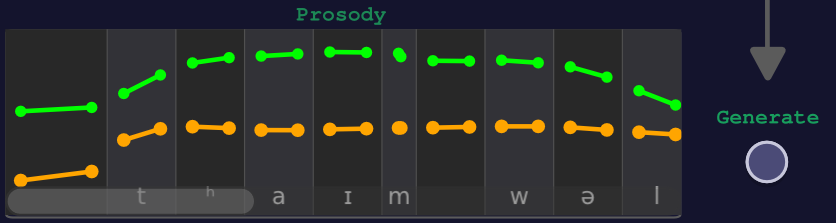
The generated pitch (orange) and energy (green) curves and durations can be edited. Durations can be changed by dragging the border of the phoneme boxes, while pitch and energy curves can be edited by dragging the points on the curves. After a change the Generate Button on the right side of the prosody window must be used.
Audio

The audio section is a simple sample player with a trigger input. The audio sample can be trimmed with the start and end knobs. The audio playback speed can be adjusted using the V/O Knob or input. There is an EOC trigger output which can be used to replay a sequence of samples, by increasing the bank (see section "The bank") replaying one after the other. For further processing or loading into an other sample player the audio samples can be saved into an wav file by clicking on the right mouse in the audio samples window. If the patch containing a SpeakerPro module is saved, then all generated audio samples are saved as well and they can be accessed after loading the patch in the Rack User folder under autosave/modules/<module_id> (the module_id is shown when right clicking on the module => Menu Info)
The bank
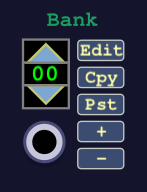
Multiple pipelines can be organized in a bank which provides copy/paste/insert/delete functions. If the input is connected it takes over setting the current bank. The input reacts to 0.1V per step e.g 0.3V leads to pipeline 3. In this case the bank cannot changed manually. However when turn on the edit button the input is blocked and the bank can be changed manually until the edit button is released.
Language Support
To input text in a different language than 'en-US', the language can be provided by preceding the text with the language code in this form: e.g. "<fr-FR>: Bonjour, comment ça va?" Note that the space is required after the colon. For convenience there is a right click menu for selecting a language.
There are different levels of supported languages. The Kokoro model itself was trained with 9 languages:
| code | voices |
|---|---|
| en-US | af_alloy, af_aoede, af_bella, af_heart, af_jessica, af_kore, af_nicole |
| af_nova, af_river, af_sarah, af_sky, am_adam, am_echo, am_eric, am_fenrir | |
| am_liam, am_michael, am_onyx, am_puck, am_santa | |
| en-GB | bf_alice, bf_emma, bf_isabella, bf_lily, bm_daniel, bm_fable, bm_george, bm_lewis |
| es-ES | ef_dora, em_alex, em_santa |
| fr-FR | ff_siwis |
| hi-IN | hf_alpha, hf_beta, hm_omega, hm_psi |
| it-IT | if_sara, im_nicola |
| ja-JP | jf_gongitsune, jf_nezumi, jf_tebukuro, jm_kumo |
| pt-BR | pf_dora, pm_alex, pm_santa |
| zh-CN | zf_xiaobei, zf_xiaoni, zf_xiaoxiao, zf_xiaoyi, zm_yunjian, zm_yunxia, zm_yunxi, zm_yunyang |
For these languages there are more accurate text to phoneme converters and the output is accent free if the languages match. One exception is hindi, as there are no text to phoneme converters available and there is no text editor capable of rendering. But nevertheless it is possible to convert hindi to ipa phonemes somewhere else and pasting the result into the phoneme window.
For the eight native supported languages the phonemes are generated word per word by a chain:
- First a lexicon which can be provided by putting a simple utf8 encoded text file "SpeakerPro_dict.txt" in the rack user folder. Pronunciation is sometimes a matter of taste and there is no text to phoneme converter which is 100% correct. So it is possible to provide own translations to phonemes.
# User Dictionary SpeakerPro
# Format: word <tab> phonemes
blood blʌd
give giv
resume ɹɪzum
- If not found then a factory dictionary is queried
- If still not found in dictionaries, an openfst model is queried
The following additional languages
ca-ES Catalan
cy-GB Welsh
da-DK Danish
de-DE German
et-EE Estonian
eu-ES Basque
fa-IR Farsi/Persian
ga-IE Irish
hr-HR Croatian
hu-HU Hungarian
id-ID Indonesian
is-IS Icelandic
ko-KR Korean
nb-NO Norwegian
nl-NL Dutch
pl-PL Polish
pt-BR Portuguese (Brazil)
pt-PT Portuguese
qu-PE Quechua
ro-RO Romanian
sr-RS Serbian
sv-SE Swedish
tr-TR Turkish
yue-CN Cantonese
can be converted into phonemes and also spoken, but with the (foreign) accent of the available voices. In this case the fdemelo g2p-mbyt5-12l-ipa-childes-espeak ai model is used to convert to phonemes.
Further native languages are added as soon there will a version of the kokoro model supporting them.
The phoneme editor
The kokoro tts model uses the following ipa alphabet:
;:,.!?—…"()“” ̃ ʣʥʦʨᵝꭧAIOQSTWYabcdefɡhijklmnopqrstuvwxyzɑɐɒæβɔɕçɖðʤəɚɛɜɟɥɨɪʝɯɰŋɳɲɴøɸθœɹɾɻʁɽʂʃʈʧʊʋʌɣɤχʎʒʔˈˌːʰʲ↓→↗↘ᵻ
The phonemes can be edited with the following keyboard layout.
| Keys | ipa char | Keys | ipa char | Keys | ipa char | Keys | ipa char | |||
|---|---|---|---|---|---|---|---|---|---|---|
| / | / | | | _ | ; | ; | : | : | |||
| , | , | . | . | ! | ! | ? | ? | |||
| - | — | _ | … | " | " | ( | ( | |||
| ) | ) | [ | “ | ] | ” | |||||
| ~ | ̃ | /Z | ʣ | J | ʥ | /z | ʦ | |||
| Q | ʨ | V | ᵝ | 1 | ꭧ | A | A | |||
| I | I | O | O | Q | Q | S | S | |||
| T | T | W | W | Y | Y | a | a | |||
| b | b | c | c | d | d | e | e | |||
| f | f | g | ɡ | h | h | i | i | |||
| j | j | k | k | l | l | m | m | |||
| n | n | o | o | p | p | q | q | |||
| r | r | s | s | t | t | u | u | |||
| v | v | w | w | x | x | y | y | |||
| z | z | 8 | ɑ | 5 | ɐ | 9 | ɒ | |||
| & | æ | B | β | > | ɔ | 6 | ɕ | |||
| C | ç | D | ɖ | /d | ð | J | ʤ | |||
| @ | ə | /z | ɚ | E | ɛ | 3 | ɜ | |||
| /f | ɟ | H | ɥ | /i | ɨ | /I | ɪ | |||
| /j | ʝ | M | ɯ | /w | ɰ | N | ŋ | |||
| /n | ɳ | /p | ɲ | /N | ɴ | 0 | ø | |||
| F | ɸ | /0 | θ | /& | œ | R | ɹ | |||
| /r | ɾ | /l | ɻ | /R | ʁ | /c | ɽ | |||
| /s | ʂ | X | ʃ | /t | ʈ | /T | ʧ | |||
| U | ʊ | /v | ʋ | ^ | ʌ | G | ɣ | |||
| 4 | ɤ | K | χ | L | ʎ | Z | ʒ | |||
| 7 | ʔ | ' | ˈ | /, | ˌ | /: | ː | |||
| /h | ʰ | /y | ʲ | /\ | ↓ | /> | → | |||
| /^ | ↗ | \ | ↘ | + | ᵻ |
There is a popup menu on right mouse click in the editor where all supported ipa chars can be looked up and selected.
General recommendations and notes
AI models are never 100% correct, and models predicting a sequence (like g2p-mbyt5-12l-ipa-childes-espeak, and also the Kokoro decoder) can have problems at the beginning and the at end. So in case of a so called hallucinations e.g. at the end can be removed either in the phoneme editor or in the audio playback via the start/end knobs.
Sometimes the AI model produces not the expected results because it was not trained for those. The model was trained on a public domain audible book library, so the reading style dominates.
Hence is recommended to use this module in a generative way. Imagination of a result and then trying to accomplish exact this result may turn frustrating. Better may be to learn how the model behaves and how the voices sound -- then cherry pick the good results.
When longer texts are needed then it is in general better to split them in short sentences and using the bank feature to store them in a sequence. This reduces the generating time significantly and it is also more comfortable to make changes in phonemes and prosody.
Credits and Licences
- Thanks to hexgrad for the kokoro tts model licenced under the apache license 2.0.
- Thanks to OpenVoiceOS for providing the onnx version of the fdemelo g2p-mbyt5-12l-ipa-childes-espeak model (apache license 2.0)
- All used licences are documented in the plugin folder.